Amazon Web Services (AWS)
Leanly's AWS integration empowers organizations to establish a solid foundation for their cloud infrastructure. It starts by enabling self-service AWS landing zones, which provide a scalable and secure multi-account setup, tailored to your organizational needs. This ensures that you adhere to best practices right from the start of your cloud journey.
From there, Leanly assists in deploying well-architected workloads, ensuring your applications and systems are optimized for performance, reliability, security, cost-effectiveness, and operational excellence — key pillars of AWS's Well-Architected Framework.
Leanly helps operationalize AWS resources, offering automation tools for incident management and prevention. This ensures that potential issues are identified early and resolved efficiently, reducing downtime and keeping your AWS environment running smoothly. With these features, Leanly supports businesses in maximizing their AWS investments while maintaining operational agility and security.
Leanly is designed to work with a model of operators, each representing a purpose-specific role - much like how your internal team might have a Database Administrator, Network Engineer, or DevOps Specialist. Instead of a single all-powerful role, you can provision multiple, scoped roles to grant Leanly only the permissions needed to perform specific tasks on your behalf.
Security Primer
In line with our best practices, credential sharing should be avoided whenever possible. Although Leanly frequently interacts with third-party systems, we’ve significantly simplified the authentication and authorization processes as part of your NoOps journey. This is achieved through:
- AWS Security Token Service (STS), which grants trusted entities short-lived, least-privilege credentials, ensuring secure and temporary access.
- Centralized integrations, enabling Leanly to authenticate seamlessly with your AWS account whenever needed, streamlining access while maintaining security across all processes.
By leveraging these mechanisms, we ensure robust security without the operational burden of managing shared credentials.
Configuration
Prerequisites
- AWS account: For more detailed instructions on creating an AWS account, please refer to the official AWS documentation.
- Leanly Tenant ID: Go to your Leanly's tenant settings and take note of the tenant's ID you want to add an AWS operator for.
Deploying an AWS operator
-
In the AWS Management Console, navigate to the CloudFormation service.
-
Click Create Stack and choose With new resources (standard).
-
In the Specify template section provide the following Amazon S3 URL and proceed by clicking Next.
https://s3.amazonaws.com/operatortemplates.leanly.cloud/AwsDevOpsEngineer.json -
Enter a stack name (e.g. "LeanlyOperator") and provide your Leanly tenant's ID as noted earlier.
-
Optional: Specify tags, permissions, and advanced options.
-
Review and Deploy: Review your configuration, acknowledge any required capabilities (e.g., IAM), and click Create stack.
-
After the deployment has finished, take note of the OperatorRoleArn value in the Outputs tab.
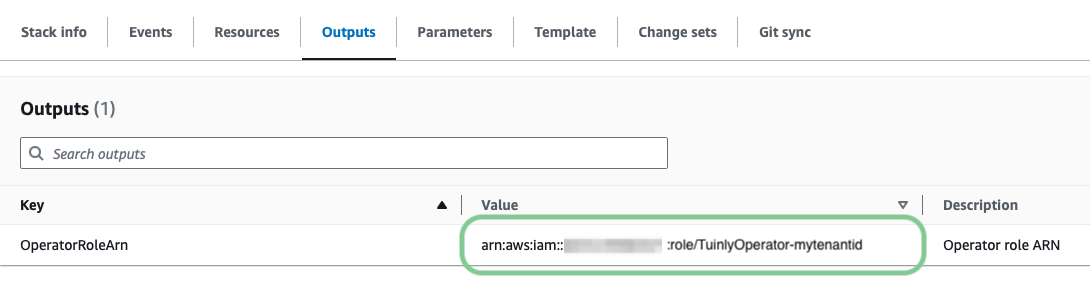 Figure 1: OperatorRoleArn in AWS CloudFormation Stack Outputs
Connecting with your Leanly tenant
-
Navigate to your Leanly tenant's integrations overview.
-
Select Amazon Web Services.
-
Click + Connect Account.
-
If you already deployed your AWS operator as outlined earlier skip to step 2, else follow the instructions in step 1.
-
Enter the ARN of your operator.
-
Finally, click Connect Account to complete the setup.
Your AWS integration is now successfully set up and ready for use in your Leanly tenant.
Operator Roles
| Role | Description | Template URL |
|---|---|---|
| DevOps Engineer | Grants Leanly permissions to manage granular, least-privilege roles for your workloads | https://s3.amazonaws.com/operatortemplates.leanly.cloud/AwsDevOpsEngineer.json |