Google Cloud
Leanly's Google Cloud integration enables organizations to securely connect their Google Cloud projects to Leanly, empowering DevOps automation and cloud management.
Leanly uses a model of operators, each representing a purpose-specific role - mirroring real-world responsibilities like DevOps Engineer. For Google Cloud, only the DevOps Engineer operator is currently supported. This ensures Leanly receives only the permissions needed for its tasks, following the principle of least privilege.
Security Primer
Credential sharing is avoided wherever possible. Leanly leverages Google Cloud's IAM and service account delegation to provide secure, auditable, and least-privilege access. You retain full control over which permissions are granted and can revoke access at any time.
Configuration
Prerequisites
- Google Cloud project: Create a project if you don't have one.
Setting up the Google Cloud Operator
-
Create a Service Account
-
In the Google Cloud Console, create a new service account
-
Assign a clear name and description, for example:
leanly-devopsengineerNote: Operators are scoped to specific roles. We therefore recommend reflecting an operator's role in it's name. If you use multiple projects (e.g. environment split) it is also recommended to include unique project identifiers, e.g.
leanly-devopsengineer-dev,leanly-devopsengineer-prod, etc.
-
-
Assign Required Roles
-
When integrating your GCP project, you should grant the least required privilege to the service account. Below are example roles and their purposes:
Role What It Does Example (When Needed) Editor (baseline) Broad permissions to deploy and manage most GCP resources. Always required — gives our platform the ability to create and manage your core infrastructure. Service Account Admin Lets us create and manage dedicated service accounts for your workloads, enforcing least-privilege access. Required if you want Leanly to automatically create separate service accounts per workload (e.g. one for your API, another for your database). IAM Workload Identity Pool Admin Enables creation and management of Workload Identity Pools so workloads can securely access GCP services without storing credentials. Required for CI/CD jobs or external systems that need temporary credentials to access GCP securely. Cloud Run Admin Full control of Cloud Run services, including deploying, updating, and managing apps. Required if you deploy applications on Cloud Run through our platform. Artifact Registry Admin Allows pushing, pulling, and managing artifacts (container images, packages) in Artifact Registry. Required if your workloads use Artifact Registry to store Docker images or build artifacts. Secret Manager Admin Grants access to manage and read secrets stored in Secret Manager. Required for most GCP stacks that rely on secret values (e.g., injecting API keys, database passwords into your apps). 💡 Tip: For more granular control, you can assign only the permissions your workloads specifically require.
-
-
Allow Leanly's Service Account Principal Access
-
Grant the following principal access to your service account:
leanly-devopsengineer@leanlyhq.iam.gserviceaccount.com -
This allows Leanly to impersonate your service account securely. See Google's documentation for details.
Is your project part of a Google Cloud Organization?
Great! This typically means organization-wide policies control which external organizations can impersonate your service accounts.
If you’re using the iam.allowedPolicyMemberDomains constraint, you’ll need to add an exception for Leanly’s directory ID:
C03w2fsp3.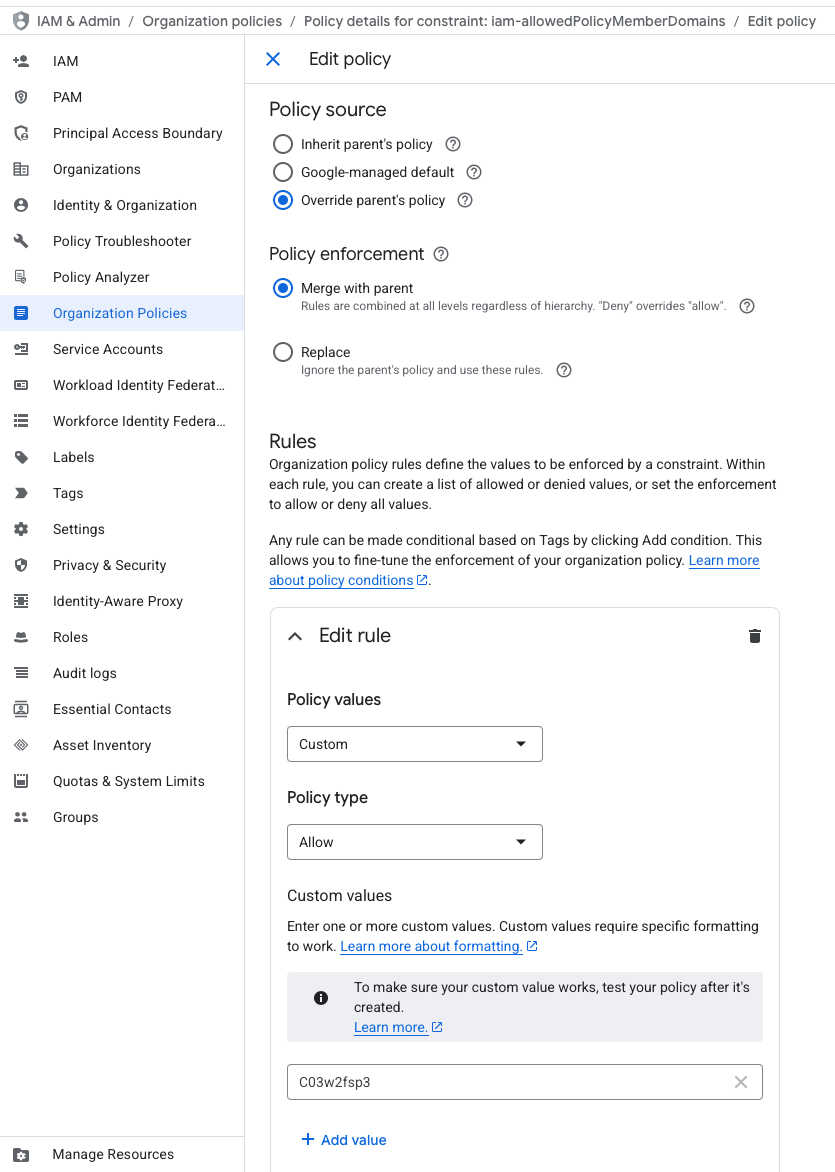 Figure 1: GCP Allowed Policy Member Domains Example
See Google's documentation for details.
-
-
Provide Service Account Details to Leanly
-
In your Leanly tenant, navigate to the integrations overview.
-
Select Configure under Google Cloud integrations.
-
Click + Add to create a new integration.
-
Assign a friendly name.
Note: Operators are scoped to specific roles. We therefore recommend reflecting an operator's role in it's name. If you use multiple projects (e.g. environment split) it is also recommended to include unique project identifiers, e.g.
Google Cloud DevOps Engineer Dev,Google Cloud DevOps Engineer Prod, etc. -
Enter the email of the service account you created.
-
Click Create to complete the integration setup.
-
Your Google Cloud integration is now ready for use in your Leanly tenant
Operator Roles
| Role | Description | Principal Email |
|---|---|---|
| DevOps Engineer | Manages platform resources, deployments, and automation in Google Cloud | leanly-devopsengineer@leanlyhq.iam.gserviceaccount.com |
Currently, only the DevOps Engineer operator is supported for Google Cloud. Additional roles will be added in the future.